Tuesday, January 26, 2016

Servathon Pre-Production Business Meeting

We're off with our next major video project in Media Production.  The other day, our students sat down in a client meeting with our Development Department to discuss the Servathon videos we need to produce.


When I look at the above photo, it blows me away.  There are three administrative team members in the room (one not pictured), two teachers (one not pictured), two staff members, and five high school freshmen (one not pictured), all taking part in the same meeting.  How often does a 15 year old student get the opportunity to sit at a table with an adult (an authority figure) and be treated as an equal?

You'll also see the big screen in the background of the meeting.  Our OneNote Class Notebook was on the screen as members of our team were typing up notes and referencing the client worksheet that was previously inputted.  (See below.)

Client Worksheet: Completed before the meeting and added by one of our teachers.

Collaborative Workspace: Students taking notes as the meeting progressed.


Close up of our fearless leader and his shiny toy. 

The next day, two of our students sat down to brainstorm ideas and put together an initial storyboard for the videos that we'll build.

Personally, I think we hit gold with our class model. These students will learn so much this semester, not just about creating quality videos, but also about being professionals and working in a small business.  I'm looking forward to what we'll see out of these students!

Thursday, January 21, 2016

Book Review: How We Got to Now

Title: How We Got to Now: Six Innovations That Made the Modern World
Author: Steven Johnson (Twitter)
Review:

"Innovations usually begin life with an attempt to solve a specific problem, but once they get into circulation, they end up triggering other changes that would have been extremely difficult to predict."

What do you think is the most world-shaping innovation ever?  If you're like me, you probably thought of something like the Internet or mobile technology.  But, we'd be thinking too narrowly.  Maybe one day those things will make the cut.

In this book, Johnson looks at innovations that have totally recreated the way we live.  Here are some interesting tidbits that I enjoyed.

  • The creation of the printing press led to a huge need for reading glasses.
  • Air conditioning changed presidential elections. 
  • You can't read this blog post without glass, but the amount of ways glass plays into bringing this post to your eyes will boggle your brain.
  • Inventing the light bulb was only one small part of actually lighting up a city. 
What does this have to do with education?  I still have hopes of one day leading my own Innovation Class, and this book may well be required reading for that class. Innovation doesn't necessarily happen in a vacuum. One person's great idea can lead someone else to another great idea.  I learned how glass artisans in Venice were forced to relocate to a nearby island which caused an explosion of glass innovation.  
...by concentrating the glassmakers on a single island the size of a small city neighborhood, they triggered a surge of creativity, giving birth to an environment that possessed what economists call 'information spillover.'
"Information spillover" sounds exactly like what I would love to see out of the innovators in my school.  By reading this book, my hopes would be that my students would see that what they create goes beyond their personal bubbles but have the potential to change the way people all around see world!


Wednesday, January 20, 2016

Using OneNote in Media Production

I co-teach a couple Media Production classes.  These classes are offered to middle school and high school and are a semester long.  This time frame seems to be a good length of time to teach the basics of video and sound production and give students a rudimentary skill set needed for recreational and (maybe) professional and volunteer media production.

But what happens when a group of students takes the class for a second semester?

We have that problem this semester, as our five high school students are last semester's four plus a friend.  These students have the skills they need to create great videos, but they need practice to improve those skills.

Our Development Department wants videos made for our upcoming Servathon.  Our Admissions Department wants videos made for our upcoming Open House. We anticipate more video requests as the semester rolls on. These videos need to be professional and serious, unlike videos they may have produced in the past.  This requires a different focus than we had the first semester.

Two days into the new semester, we set up a faux business model, calling our students employees and we are the supervisors. But we wanted a digital tool to tie it all together.

Enter OneNote Class Notebook.

We have five students all working on completely different projects, filming, editing, teaching, and learning.  It's easy for someone to lose track of what he is supposed to do each day.  Likewise, it's not hard for the over-achiever to get slammed with work while the YouTube wonder sits back and watches videos for four days straight.  OneNote removes that problem.  Every Monday we will start class with a staff meeting, assigning jobs for each day of the week and posting them in OneNote.  This is especially helpful on those days when one of the co-teachers can't make it to class.  We can all access the same information in the same place.

We have places set up for storyboards to reside and places for the guys to take notes about the mistakes they made and the ideas they have for future projects.  We have collaborative space where great ideas can bloom and individual work spaces where students can jot their private ideas.

Creative team meetings can happen on our Aquos touch screen, with storyboarding drawn directly into the notebook. At the same time, students can type daily updates so "supervisors" and "employees" can have a running journal of how a project was put together.

We even have a page for "employee reviews" (aka rubric) so students know exactly what is expected of them.

I'm looking forward to seeing how this semester turns out as we use this great teaching tool to guide our video productions.


Tuesday, January 12, 2016

Loving the Least of These

A high school student asked, "Mr. Dunlap, what J-Term class are you teaching this year?"
Me: "Orphan care."
Him: "Oh..."

I got a chuckle out of that conversation.  I explained to the student that I have two main passions, and this year I wanted to focus on the other passion. As a technology teacher, the expectation would be that my J-Term class would focus on technology in some way. Most of my students know that I'm an adoptive dad, and it just makes perfect sense that I care deeply about caring for the fatherless.

We hold J-Term for our middle and high school students during the first week back from Christmas Break.  Classes are roughly 2 1/2 hours long each and have nothing to do with the regular curriculum.

One of my colleagues, Jessica Finney, and I teamed up to teach the class.  I was a bit disappointed that our class had only four students, but I can honestly say that they were the right four students.  By selecting our class, they had to give up the chance to decorate cakes, survive in the wilderness, crochet, take care of cats in a shelter, and do a host of other fun classes.  Obviously, they had a reason to want to learn about serving the fatherless before they walked into class on Monday. 

Show Hope has a great student club, called The Movement, which provides materials necessary to launch high schoolers into action.  The goal was to use this curriculum heavily to help us through the week.  However, something strange happened when we got students in front of us.... They connected better with personal stories.  They soaked in the stories we told and kept asking more and more questions.  They wanted to watch more videos about adoption and foster care.  In short, they couldn't get enough stories.  

To quote Chris Wheeler from Show Hope, the intent is to move students "from unaware to aware to action."

The "unaware to aware" part was easy. We just put on a parade of guest speakers to talk about how adoption has affected their lives.  I'll list the guest speakers below, but we hit a broad range of topics just by talking about personal experiences.  Domestic and international adoption and foster care were certainly part of our discussions.  However, we talked about why there is an orphan crisis to begin with -- unwanted pregnancies, abusive parents, and poverty to name a few.  We talked quite a bit about the costs of adoption and ways to fund adoptions.  We showed videos and looked at blogs and Instagram posts.  We invited speakers in via Skype.  We also talked about Compassion International which is an organization that helps to end poverty in third world counties.  By sponsoring a child, you provide them with food and education to help them make a difference in their country.  If you look hard enough, there are examples all around of the orphan crisis and how someone can stand up for orphans.  And that doesn't always mean adoption.  There are tons of ways to help someone in need.

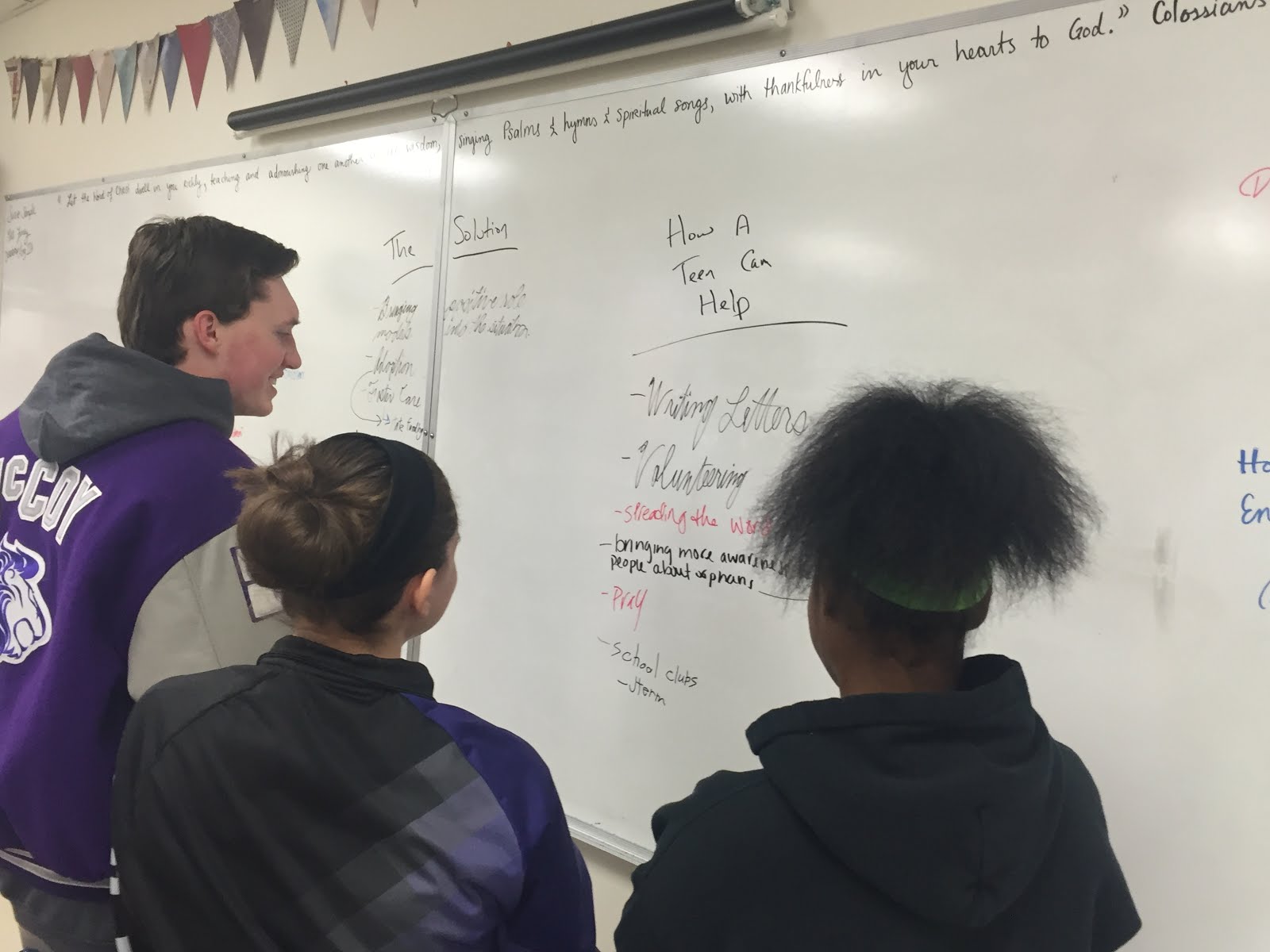
To be honest, I am stunned how much we covered in a short time.  On Wednesday, we put three columns on the board (The Problem, The Solution, How a Teen Can Help) and asked them to fill the columns with their ideas.  In my opinion this was a watershed moment for the class.  We took all our thoughts swirling in our heads and got them written down in front of our faces.


In the second half of the week, we got more personal by talking to the students' peers.  We had a total of four visitors, three girls who have been adopted and a fourth whose two sisters were adopted out of foster care.  All four stories were incredibly different, but it helped our students see how adoption can even influence people they know well.

The second part of the plan was to move from "aware to action."  That was a bit tougher.  First, it's not right to assume a student wants to be part of the solution.  Second, the students need to take ownership of the action. I could certainly push them to do some things but for it to be meaningful the ideas really had to be their own.

It was so encouraging to hear them talk about wanting to be adoptive parents or siblings.  At least two of them are contemplating taking missions trips to China.  We've talked about starting a club next year and about how a college student can be an advocate for orphans.  I wouldn't be surprised if this summer finds a volleyball camp at our school for foster kids and it won't be long before awareness posters are up in the hallways at school.

Sadly we ran out of time before we put together a solid action plan for the future, but I'm just excited to see teens with a desire to help those in need.

Now, to my thank you section...

  • Jessica Finney -- teacher at MVCA and future foster/adoptive mom. When I say "we," many times I mean "she." Jessica has broad knowledge of anything dealing with foster care, adoption, and helping those in poverty.  
  • Shawn Baker -- adoptive dad and Founder of Zoe's House. 
  • Randy Bohlender -- adoptive dad and Executive Director of Zoe's House.
  • Lynn Woods -- True Voices 
  • Kay Pardue -- Show Hope
  • Chris Wheeler -- adoptive dad and Director of Student Initiatives at  Show Hope
  • Robert Vilardo -- adoptive dad and Athletic Director at MVCA 
  • Amy Kinnell -- adoptive mom and case worker with Adoption Assistance 
  • Those four girls who shared with our class.  They will remain nameless but we appreciate making their personal stories public.
  • The four students in class who moved from unaware to action.  Wow! Can't wait to see what happens next! 

Friday, November 13, 2015

Tic Tac Toe?

I've been struggling with teaching my 4th graders about sharing documents using OneDrive. Their worlds were opened this year when we gave them email and OneDrive accounts.  Before then, their documents didn't go any further than a flash drive and a printed paper.

Things are different now. They can create, share, and collaborate online in the cloud, and this isn't an easy concept to teach them.

So, today we played Tic Tac Toe.  Half the students created a board (3x3 table) and shared with the other half class.  They had to play 3 games and tell me who won each game.  And it was a success. Everyone saw collaboration on their screen and got a feel for how the process works.


The best was hearing the collaboration in the air as students were cheering and jeering across the room and helping each other figure out the process. I'd call it a success.

Maybe next week we'll do something serious.

Thursday, November 12, 2015

Observation Notes: Summit View Academy

Last week, I had the opportunity to observe at Summit View Academy, the school where my daughter attends.  When my principal announced that we needed to observe in another school in November, it only made sense to me to visit SVA to see how the STEAM conversion is coming along.

-----------------------------------------------------------

I blogged in the spring about their jump to becoming a STEAM academy and how I would love to be part of things going on there. It was a rare treat to get a "behind the scenes" look at the transition and meet with some of the key players.

-----------------------------------------------------------

I spent a couple hours in Mrs. Kidwell's 4th grade class. Mrs. Kidwell is the school's iPad expert.  A few years ago she wrote a grant to receive a cartful of iPads, and today hers is the only class with a collection of iPads.  

I was impressed by a few things in Mrs. Kidwell's room, not the least of which is that iPads were prevalent in every aspect of class.  Students used an app to report their attendance.  They used iPads during "bell ringer time" and as centers during reading group time.  

Mrs. Kidwell's students are also given student project choices.  Once a semester, she passes out STEAM Assignment Choice Boards with 8 project ideas.  During the course of the semester, students are required to do 3 of the projects on the handout.  These projects span various media and content areas, but they all reflect back on student learning and some sort of STEAM focus.

-----------------------------------------------------------

My next stop was the middle school library to see Mrs. Jones teach Digital Literacy, and I was pleasantly surprised to see her teaching a lesson from Common Sense Media that I have taught at my school numerous times. Seeing someone else teach the same lesson showed me a few tips how I can teach that lesson better and I'm looking forward to my next attempt soon.  

Mrs. Jones is tasked with starting up the school's maker space in the library, and you can see the excitement radiate on her face when she talks about it.  The 3D printer is set up, but the rest is still in the planning phases. In addition to planning out equipment and supplies, she also needs to figure out how to use a maker space, library, and digital literacy class in one room. I don't envy her.  Once a month, our local public library comes in to help with a Maker Club after school, which is a great way to get the idea started.

Mrs. Jones also oversees the morning announcements which are live-streamed to each class at the start of the day. I had the joy of watching the announcements in Mrs. Kidwell's room then seeing the room where the magic happens.  (Incidentally, my daughter would be jealous that I was in this room. She runs through the morning announcements often during her play time.)


-----------------------------------------------------------

I also had the chance to spend some time with Mr. Chavez, the district's STEAM Consultant.  

As a parent, when I heard about the STEAM initiative, I thought it would be an instantaneous change.  It turns out that they are planning on a three-year transition, and the biggest hurdle so far has been melding two schools into one.  That brought to mind when our school went from two principals to one, and we really started to think and act like one school. It takes a lot of work and great leadership to pull that off.  Now that the administrative aspects of this transition are wrapping up, the school is starting to focus more on STEAM and how to integrate it into their philosophy. 

This has been an arduous task because PreK-8 STEAM schools simply do not exist.  Mr. Chavez and others are gleaning whatever information they can from whatever source they can find to make the shift.  This includes talking to STEAM high schools and asking parents and other community members for help.  This is where it's been fun for me to share what I know of technology integration and give some tips to help out.  Our school is about two years ahead of them with OneDrive and all the subsequent applications, and I've been able to wow them with Teacher Dashboard. 

Mr. Chavez's enthusiasm for STEAM is contagious.  One of the best parts of my day was his tour of the school with an eye for STEAM change. He has studied the building and its physical space to see how rooms and courtyards can be better utilized to aide the transition. It's going to be great!

-----------------------------------------------------------

Overall, I love the exchange of ideas happening between schools.  I'm excited to see what's happening at SVA and love being able to share my knowledge with them. I'll be keeping an eye on how things progress over the months and years! 

Wednesday, October 28, 2015

Genius Nuggets Round 1 Wrap Up: Part 2. (Good Stuff)

I recently wrapped up "Genius Nuggets" in my upper elementary computer classes, dedicating a month to students creating projects of their choice and presenting them to their classes.  While the students did good work overall, I did write a reflective blog post talking about things I learned through the process and how to make it better.  Now, I want to turn around and look at the good things that came out of the process. This will be a lot happier.

Good Stuff 1:  Parents learned alongside the kids.  This was not an intended aspect of the project, but it happened. It's the nature of the beast. If kids are doing schoolwork at home, Mom or Dad are watching over what happens... and in this case some learning happened with the adults. My personal favorite was with one young lady who thought she sent me her video. Turns out that she didn't.  Mom had to figure out how to publish it to YouTube to get it to me.  It worked. 

Good Stuff 2: Student passions really came out.  I was impressed with some of the topics that came up, not the trendy fare you may expect from preteens.  Here are some of my favorites:
  • Haitian Earthquake of 2010
  • How the Internet Works
  • Behind the Scenes at the Zoo
  • How to Do a Bunny Hop (I needed clarification on this one. It's a bike move.)
  • How to Fly a Remote Control Plane
  • Learning 10 Words in French
There were a lot of good ideas, but the great thing is that students were motivated because they learned about topics that interested them.

Good Stuff 3:  We got to listen to some excellent presentations and see some good learning.  Here are a handful of the impressive ones.  
As the dust settles on this round of projects, I'm already looking forward to the next set of projects coming up in January. I'm so excited to build on this foundation and see students create some truly incredible projects.