I teach 5th grade social studies. Our school has a gifted program which pulls kids out of social studies class. The cutoff for that program is an IQ of 120 rather than the normal cutoff of 130. I have ten kids in my class, but all of the top, bright, leader students are in the other class. Having a class discussion is like pulling teeth because no one wants to talk. We reviewed for a test today, and what should have taken 10 minutes took 30 with bored looks and noises all over the place.
Today we went over the study guide. It's a necessary evil. They have to have correct answers so they study the correct information. However, it's a boring procedure.
How do I use technology to spruce it up? Ideas?
Friday, November 4, 2011

Tuesday, November 1, 2011
Technology Integrators (#1)
I plan on creating a post once a week talking about the world of technology integration. As I spend time researching and learning new things, I'll post summaries and links in my post and put it out there for everyone to learn. Of course, in today's world, what I learn today could be old news next week, but we'll give it a go.
While I was reading about this I discovered paper.li, a site that automatically creates a newspaper based on what you are following on Twitter. I filtered out the stuff about my favorite musicians and athletes and landed with this. Tell me what you think? It changes each day. So, bookmark, subscribe to it, and check back often.
http://paper.li/Cncdky/1320172334
Cool Cat Teacher is an amazing teacher/integrator. Read her Daily Paper at http://coolcatteacher.visibli.com/share/erWxdC.
How can you stop lecturing and start students doing projects that promote learning instead?
http://www.edutopia.org/stw-maine-project-based-learning-replication-tips
Here is an article on why you should join Twitter too. Let's face it. With today's Internet, we're all networking more and more. Twitter is a place where today's educational technology integrators are meeting. Read more at http://paper.li/shurrey/1292300532?utm_source=subscription&utm_medium=email&utm_campaign=paper_sub.
Speaking of networking, here is an article talking gathering together teachers, administrators, and students to work together to create a technology plan that can work. It also mentions the need for using such social networks as Facebook and Twitter in the regular classroom.
http://innovativeedu.visibli.com/share/CJK52f
How are you using technology in your classroom? There are three models you can choose from: doing old things in old ways, doing old things in new ways, or doing new things in new ways. Guess how the author thinks you should be doing things.
http://www.edutopia.org/adopt-and-adapt
Technology integration in elementary school? Can we use blogging, video penpalling, and podcasts to help the kids learn. I mean.... the kids doing these things, not necessarily the teacher. See how one school district in South Carolina is doing this effectively.
http://www.edutopia.org/stw-differentiated-instruction-technology-integration
Let's end with a question. What are your thoughts on this tweet I just read?
"Kids are not only consuming information, they are producing it. And our classrooms need to reflect that. (ClaudiaCostin)
Thanks for reading. Let me know what you want me to cover, and I'll try to find it.
While I was reading about this I discovered paper.li, a site that automatically creates a newspaper based on what you are following on Twitter. I filtered out the stuff about my favorite musicians and athletes and landed with this. Tell me what you think? It changes each day. So, bookmark, subscribe to it, and check back often.
http://paper.li/Cncdky/1320172334
Cool Cat Teacher is an amazing teacher/integrator. Read her Daily Paper at http://coolcatteacher.visibli.com/share/erWxdC.
How can you stop lecturing and start students doing projects that promote learning instead?
http://www.edutopia.org/stw-maine-project-based-learning-replication-tips
Here is an article on why you should join Twitter too. Let's face it. With today's Internet, we're all networking more and more. Twitter is a place where today's educational technology integrators are meeting. Read more at http://paper.li/shurrey/1292300532?utm_source=subscription&utm_medium=email&utm_campaign=paper_sub.
Speaking of networking, here is an article talking gathering together teachers, administrators, and students to work together to create a technology plan that can work. It also mentions the need for using such social networks as Facebook and Twitter in the regular classroom.
http://innovativeedu.visibli.com/share/CJK52f
How are you using technology in your classroom? There are three models you can choose from: doing old things in old ways, doing old things in new ways, or doing new things in new ways. Guess how the author thinks you should be doing things.
http://www.edutopia.org/adopt-and-adapt
Technology integration in elementary school? Can we use blogging, video penpalling, and podcasts to help the kids learn. I mean.... the kids doing these things, not necessarily the teacher. See how one school district in South Carolina is doing this effectively.
http://www.edutopia.org/stw-differentiated-instruction-technology-integration
Let's end with a question. What are your thoughts on this tweet I just read?
"Kids are not only consuming information, they are producing it. And our classrooms need to reflect that. (ClaudiaCostin)
Thanks for reading. Let me know what you want me to cover, and I'll try to find it.
Sunday, October 30, 2011
Geocaching in Education
I'm writing this post as a favor to another educator who asked me about using geocaching as a teacher. Let me start this post by being flat out honest. I've never used geocaching in the regular classroom. A few years ago, I did a geocaching week as an enrichment course in the summer. This post is bringing together some research I found and my experiences as a cacher.
First, for the caching newbie, here is a quick video to show you what I'm talking about.
Now that you know what geocaching is, let's think about the lessons we can teach using geocaching.
The most obvious lesson learned is about latitude and longitude, but this may actually be a hard concept to teach through caching. When out in the field, I don't think about my position on the earth. I follow an arrow to the spot. Latitude and longitude don't play out in how I cache, per se.
We can also learn about satellite technology and triangulation through geocaching. This would be a great way to explore HOW GPS receivers work.
There are plenty of other areas to explore through caching:
Geocaching is an incredible way to teach problem solving. Puzzle caches are chock full of logic questions ending with the reward of a cache at the end of the puzzle. I love creating puzzle caches, so look me up here. You'll see some cool puzzles that I've created. Then, look up my friend Sled Dog. He's my puzzle cache mentor.
There are some hindrances to geocaching as a normal "classroom" activity.
First, for the caching newbie, here is a quick video to show you what I'm talking about.
Now that you know what geocaching is, let's think about the lessons we can teach using geocaching.
The most obvious lesson learned is about latitude and longitude, but this may actually be a hard concept to teach through caching. When out in the field, I don't think about my position on the earth. I follow an arrow to the spot. Latitude and longitude don't play out in how I cache, per se.
We can also learn about satellite technology and triangulation through geocaching. This would be a great way to explore HOW GPS receivers work.
There are plenty of other areas to explore through caching:
- Ecology: You learn to appreciate the surroundings you're in.
- Creativity: See the video below for creative caches. Even if you don't get that crazy with the creativity, good cachers will find ways to camouflage their containers.
- Physical Fitness: You can cache in such ways that you never have to stray far from your car, or you can stretch yourself. There are caches that require miles of hiking, climbing, caving, swimming, and more. Some of my favorite cache finds involved some serious physical exertion, but you feel a sense of accomplishment when you're done.
- World Geography: Using geocoins, you can track items as they travel around the country and the world. We dropped a coin off in Seoul, South Korea, and watched it as it traveled back to us in the States.
Geocaching is an incredible way to teach problem solving. Puzzle caches are chock full of logic questions ending with the reward of a cache at the end of the puzzle. I love creating puzzle caches, so look me up here. You'll see some cool puzzles that I've created. Then, look up my friend Sled Dog. He's my puzzle cache mentor.
There are some hindrances to geocaching as a normal "classroom" activity.
- By rule, caches are not allowed to be on school campuses. So, even though a lot of schools have plenty of great hiding places, cachers may not hide caches there. That means traveling off campus.
- While I've never had a serious injury caching, there are plenty of safety concerns: travel, hiking, falling, bee stings, poison ivy.
- Time is another issue. You can't fit a caching run into an hour long period. You need more time to get the full fun of the activity.
How can you make it happen?
- There is nothing stopping you from placing your own caches on your school campus and not post them online. You can even have the students hide them in groups one day and have the rest of the class find them another day.
- I once did an intro to caching talk and hid caches in the conference room where we met.
- Why not start a caching club that meets after school one day a week?
Want more info? Read up on these links.
- http://alicechristie.org/pubs/E6/index.html
- http://opedagogen.se/ (You may want to translate it to English.)
- http://www.springhurst.org/geocachingkids/springhurst/index.html
- http://www.gis2gps.com/GPS/lessonplans/gpsplans.htm
Friday, October 28, 2011
iPad Discipline
I just sent my first iDiscipline email. Boy #1 emailed me an assignment from his iPad. Just as the email rolled in, I saw him leaning over and tapping another kids iPad. I shot back an email, "Stopping messing with Boy #2's iPad." Fun!
Thursday, October 27, 2011
Tech committee meeting 10/26/11
We had our first Tech Team meeting yesterday to discuss the future of the technology program at our school. Here are some questions and concerns that popped up during our talk.
Apparently, some of our high school students are using their iPads for non-educational use during class. You know... goofing off. Of course, like passing notes in class, it's not exactly easy to monitor such things while doing everything that a teacher needs to do in class. Right now the mindset with the teachers is that students will learn to sink or swim with the technology: learn to use it as a toy or a tool, but learn the hard way. However this all begs a question. Is there a way to monitor these things? What techniques are there to "catch students red-handed"?
More and more teachers at our school are building their own web sites, using whatever platform they want to build it from. Personally, I use Google Sites, which I find incredibly easy to use. Some of my colleagues use Weebly, which they claim is incredibly easy to use. The problem is that parents find themselves having to check multiple web sites for various things. We are starting the search for a program/web site/app that will handle as much as possible of the following things -- administrative tasks, lesson plans, grade, classroom web sites, parent notices, teacher emails, etc. What's out there that's good? What does your school use?
What is the best method for turning work in paperlessly? If we created a school-wide consistent method what would it be? Have you played with iCloud enough to know if it works well? Would you use Dropbox? My colleague likes SugarSync. Are you familiar with that?
We're also looking at creating a three year technology plan. Where does one start with that? It seems hard to make a plan when we don't know what technology we'll be looking at in three years or what teachers and students will be able to do in three years. Of course, creating a plan is a whole lot better than letting each teacher decide what cool project they are going to do with the kids. This isn't entertainment. It's training our students to be lifelong learners and technology users.
How do we convince teachers who are overworked and undertrained to use their iPads to the fullest so the students use their iPads?
Finally, what is one site that needs to be unblocked at school so I can be the best technology collaborator possible? I'm thinking it's Twitter, but believe it or not, there are some Blogger pages I can't open. I'm going to fight battles one at a time. What should be my first one?
I'm sending out my questions, hoping that some collaboration can happen with tech leaders outside these walls. Maybe you can't answer them all, but I'd love to hear anything you have on the topics.
Thanks for your help.
Apparently, some of our high school students are using their iPads for non-educational use during class. You know... goofing off. Of course, like passing notes in class, it's not exactly easy to monitor such things while doing everything that a teacher needs to do in class. Right now the mindset with the teachers is that students will learn to sink or swim with the technology: learn to use it as a toy or a tool, but learn the hard way. However this all begs a question. Is there a way to monitor these things? What techniques are there to "catch students red-handed"?
More and more teachers at our school are building their own web sites, using whatever platform they want to build it from. Personally, I use Google Sites, which I find incredibly easy to use. Some of my colleagues use Weebly, which they claim is incredibly easy to use. The problem is that parents find themselves having to check multiple web sites for various things. We are starting the search for a program/web site/app that will handle as much as possible of the following things -- administrative tasks, lesson plans, grade, classroom web sites, parent notices, teacher emails, etc. What's out there that's good? What does your school use?
What is the best method for turning work in paperlessly? If we created a school-wide consistent method what would it be? Have you played with iCloud enough to know if it works well? Would you use Dropbox? My colleague likes SugarSync. Are you familiar with that?
We're also looking at creating a three year technology plan. Where does one start with that? It seems hard to make a plan when we don't know what technology we'll be looking at in three years or what teachers and students will be able to do in three years. Of course, creating a plan is a whole lot better than letting each teacher decide what cool project they are going to do with the kids. This isn't entertainment. It's training our students to be lifelong learners and technology users.
How do we convince teachers who are overworked and undertrained to use their iPads to the fullest so the students use their iPads?
Finally, what is one site that needs to be unblocked at school so I can be the best technology collaborator possible? I'm thinking it's Twitter, but believe it or not, there are some Blogger pages I can't open. I'm going to fight battles one at a time. What should be my first one?
I'm sending out my questions, hoping that some collaboration can happen with tech leaders outside these walls. Maybe you can't answer them all, but I'd love to hear anything you have on the topics.
Thanks for your help.
Wednesday, October 19, 2011
A Fun Use of Wikis
This was my fifth graders' first use of wiki technology as writers. I'm quite proud of them. Check it out!
https://mvcaelementary.wikispaces.com/
https://mvcaelementary.wikispaces.com/
Friday, October 7, 2011
Pictures!
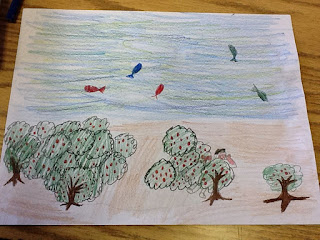
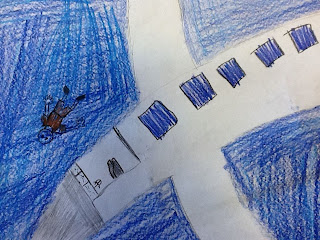
This may seem to be a simple use of the iPad, but you gotta start somewhere. Behold! My kids drew pictures of their favorite scenes from Hatchet. Then, they took my iPad2 and took pictures of their pictures. Fun stuff!






Subscribe to:
Posts (Atom)